News & Articles 18.11.2026
 SpeedyGo: One plugin to make your WordPress website faster
 Corvexa: AI that turn more website visitors into qualified leads.


 Energy
 Oil and gas
 Transportation
 E-commerce
 Healthcare
 Real Estate
 Fintech
 Manufacturing
 Education
 Agriculture
 Travel
 Cyber Security
 Crypto
 Law and Order
 Entertainment
 Hospitality
 Logistics
 Non-profit
 Digital Industry
 Venture Capital

A Quick Guide on the Right Software Development Approach for Enterprises in 2023


 18/11/2026


Quick Summary
We normally search on Google when we need a company or service. But these days, people are asking ChatGPT too. Like if someone needs a website, they might ask ChatGPT which company can make it for them.
Now ChatGPT will suggest a few companies, but what about your company? Why is it not showing there? Can you do anything about it? Yes, there are some things you can try, but it doesn’t mean ChatGPT will surely recommend you. So here we’ll see what you can do and what things you should not waste your time on.
Suppose someone wants to redesign their website. Normally, they will go to Google, search for website design companies, open a few websites, and then decide whom to contact.
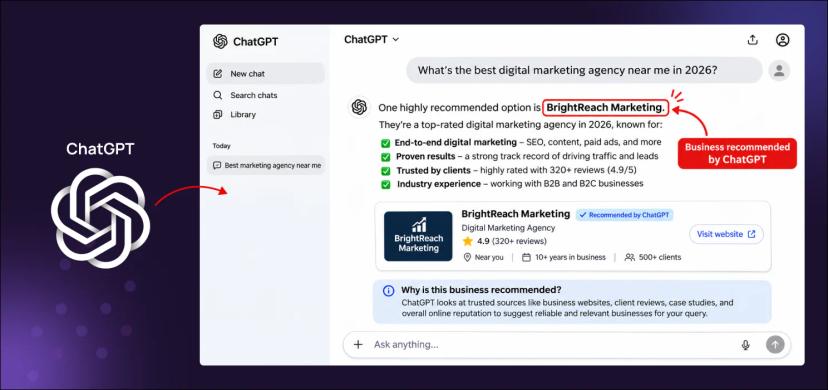
But now they can just ask ChatGPT, “Can you suggest a good company for website redesign?”
And ChatGPT will give them some company names. They can even ask more things like, “Which one works with WordPress?” or “Which company also does SEO?”
So they don’t have to keep searching again and again on Google.
Now think: what if your company is one of those names ChatGPT suggests? That person might visit your website and even contact you for work.
But if your company is not showing there, they may not even know about you. And that’s why businesses now want to know how they can get their company name in ChatGPT recommendations.

Now the question is, how does ChatGPT know which company to suggest?
See, ChatGPT is not exactly like Google. It already has information from its training, and sometimes it also searches the internet to find answers. Like if someone asks for a Shopify development company, ChatGPT may search online and find companies that do this work.
But why will it suggest one company and not another? That is something we don’t know exactly. Even OpenAI has not shared all the details about it. You can read more in their ChatGPT Search guide.
Now suppose you have a Shopify development company. On your website, you have mentioned what services you provide, what kind of projects you have done, and other details about your work. And there is another company whose website just says they provide digital solutions, but nothing much about Shopify.
Now ChatGPT has more details about the first company, like what work they do and what projects they have completed.
So what can you do from your side to get your business showing in ChatGPT? Here are 8 things you can check.
1. Make Sure ChatGPT Can Access Your Website
First, see if ChatGPT can read your website or not.
OpenAI has a bot called OAI-SearchBot. This bot goes to websites and checks what is there. But what if your website is not allowing this bot? Then it may not be able to read your website pages.
So how to check?
There is one file called robots.txt on your website. You can ask your developer to check it.
The code to allow the bot looks like this:
User-agent: OAI-SearchBot
Allow: /
But don’t just put this code anywhere. First, check what is already in that file.
Also, there is one more bot called GPTBot. That is used for AI training. You don’t need to allow that one for ChatGPT Search. Sometimes the website firewall also blocks bots. So check that too. You can read OpenAI’s guide to learn more.
That’s all. Just check that your website is not blocking OAI-SearchBot. It doesn’t mean ChatGPT will surely show your company, but at least the bot can come to your website and read your pages.
2. Clearly Explain What Your Business Does
Now go to your website and see what you have written on the homepage. Like, if I open your website, can I understand what your company is doing?
Some websites write things like “We provide innovative digital solutions.” But what is this? Are you making websites or selling software or doing something else?
Instead just write clearly, “We make WordPress websites, WooCommerce stores and web applications.”
Now at least people know what work you do.
Same if you have a shop. Tell what you sell. If you provide any service, tell what service you provide.
Also see if these things are there on your website:
That’s it. You don’t need to write big big words on your website. Just tell people what your business does. So if ChatGPT checks your website, it can also get some information about your company.
3. Create Dedicated Pages for Your Main Services
Suppose your company does WordPress development, Shopify development, SEO, website maintenance and some other work also.
Now if you write all these services in just one small paragraph on your homepage, how will people know what exactly you do in each service?
So better make one page for each main service. Like if you do Shopify development, make one page only for Shopify.
On that page you can tell:
Now if someone needs a Shopify developer, they can open that page and see what all you do. And if ChatGPT is searching for Shopify companies, it can also find more details about your Shopify work from that page. You don’t have to make pages for every small thing. Just make separate pages for your main services first.
4. Keep Your Business Information Consistent Across the Web
Your business details are on Google, LinkedIn and many other websites also.
But did you check if everything is correct there?
Suppose you changed your office address, but on Google it is still showing your old address. Now someone wants to visit your office and goes to that old address. Then what?
Same can happen with your phone number or services also. Maybe you changed your number but forgot to change it on some websites. So just go and check where your company is listed. If you see any old details, update them. And if you have a Google Business Profile, check that also.
5. Publish Content That Answers Real Customer Questions
Now think what people ask you before buying your product or taking your service.
Like if someone wants to make a website, they may have many questions.
Now these are the things people really want to know.
So you can make blogs on these questions. Like if someone wants to know website redesign cost, tell them how much it can cost. Some websites are simple so they cost less. Some need more work so they cost more. Tell them about extra charges also. Because people want to know these things before spending their money.
Google also says to write content for people, not only for search engines.
So don’t just think about ChatGPT when writing blogs. Think what people want to know and write about that.
6. Show People What Work You Have Done
Anyone can write on their website that they are the best company. But how will people know if you are really good or not?
Like if you make websites, show some websites you made for your clients.
If you sell products, show proper photos, details and what your customers are saying about them. Suppose you made one client’s website faster. Then tell what problem was there before, what you changed and how much faster it became. If you have real numbers, you can show them also. If you have done some good work for clients, put it on your website. Add their reviews also if they have given any.
So when someone comes to your website, they can see your work and decide if they want to hire you or not.
7. Claim Your Business Profile in ChatGPT
Now you can add your business on ChatGPT also.
OpenAI started this new feature on November 10, 2026. Its name is Businesses in ChatGPT.
So go to ChatGPT Business Hub and search your company name.
If your company is there, you can claim it. If not, some online businesses also get an option to add a new one.
Then you have to prove that the company is yours. Once OpenAI approves it, you can change your business details there.
If you have an online store, you can add your products, prices and stock details also. There is also an option to see how many times people are finding your business on ChatGPT.
8. Check If Your Business Is Showing in ChatGPT
Now you have done some changes on your website. But how will you know if ChatGPT is showing your company or not?
You can check it yourself. Just open ChatGPT and ask something related to your business.
Like if you make websites, you can ask:
Now see what companies ChatGPT is showing. Is your company there? If not, which companies are coming?
You can also see which websites ChatGPT is taking information from. But don’t check only one time and think your company is not showing anywhere. Sometimes ChatGPT gives different answers when you ask the same thing in a different way. Your location and the conversation can also change the answer.
And if you have verified your company in ChatGPT Business Hub, you may get an Insights option also. There you can see things like how many times your business was mentioned, how many people clicked your website and what topics people were searching for in the last 28 days. But you cannot see what each person asked ChatGPT.
You can also check your website analytics to see if people are coming from ChatGPT.
Just check these things from time to time. Don’t expect your company to start showing everywhere just because you changed something on your website.
Need Help Checking Your Website?
Now maybe you want to do all these things but don’t know where to start.
You can contact Code and Core. We can check your website and see if there are any problems with the pages, speed, SEO or website settings.
If something needs to be fixed, our team can help you with that also.
So if you want your business to show on ChatGPT, first check your website. See if ChatGPT can read your pages or not. Check if you have written properly what your company does. If your phone number, address or anything is old, change it. And if you have done some good work for clients, put that on your website also. You can make your business profile on ChatGPT too, if the option is available for you.

There could be several reasons. ChatGPT might not have enough information about your company, your website might be blocking its search bot, or other businesses might be more relevant to the question someone asked. Also, ChatGPT doesn’t always recommend the same companies to everyone.
You cannot pay to guarantee a recommendation in ChatGPT’s regular answers. ChatGPT may recommend businesses based on the user’s question and available information. Paid advertising, where offered, is separate from these recommendations.
SEO can help make your website easier to find and understand. Having clear service pages, useful content and correct business information can also help ChatGPT find relevant details about your company. But ranking well on Google doesn’t automatically mean ChatGPT will recommend you.
No. ChatGPT can mention businesses even if they haven’t claimed a Business Profile. However, if your business is eligible, claiming its profile can help you manage the information available through ChatGPT Business Hub.
There is no fixed timeline. Updating your website or creating a business profile doesn’t mean your company will appear in recommendations within a few days or weeks. It depends on whether ChatGPT can access relevant information and whether your business matches what someone is looking for.
Open ChatGPT and ask questions that your potential customers might ask. For example, if you provide WordPress development services, try asking for WordPress development companies. Check whether your business appears and repeat the test with different questions. You can also monitor website visits coming from ChatGPT.
Yes. You don’t need to be a big company to appear in ChatGPT recommendations. A small business with clear services, useful website content and relevant experience may be recommended when it matches what someone is looking for. However, there is no guarantee.
Catch wind of the latest technologies, strategies, and information that are set to boost your business operation. We update frequently!