Technologies 12.10.2026
12.10.2026 SpeedyGo: One plugin to make your WordPress website faster
 Corvexa: AI that turn more website visitors into qualified leads.

 Energy
 Oil and gas
 Transportation
 E-commerce
 Healthcare
 Real Estate
 Fintech
 Manufacturing
 Education
 Agriculture
 Travel
 Cyber Security
 Crypto
 Law and Order
 Entertainment
 Hospitality
 Logistics
 Non-profit
 Digital Industry
 Venture Capital
A Quick Guide on the Right Software Development Approach for Enterprises in 2023


 20/10/2026


| Quick summary
Should you build a CRM around your business, or pay for Salesforce? This guide compares custom CRM vs. Salesforce in plain English, with real list prices, a simple break-even example, and clear signs of which route fits you. You will also learn how to build custom CRM software safely and how to choose a CRM development company.
|
A sales manager once showed us her team’s Salesforce screen. It had 40 fields on every lead. “We use maybe eight of them,” she said. “The rest is noise. And the one thing we really need, a quote step that matches how we work, costs extra.”
She was not unhappy with Salesforce. It is a powerful tool. She was paying for a lot of power she did not use, and missing one feature she needed badly.
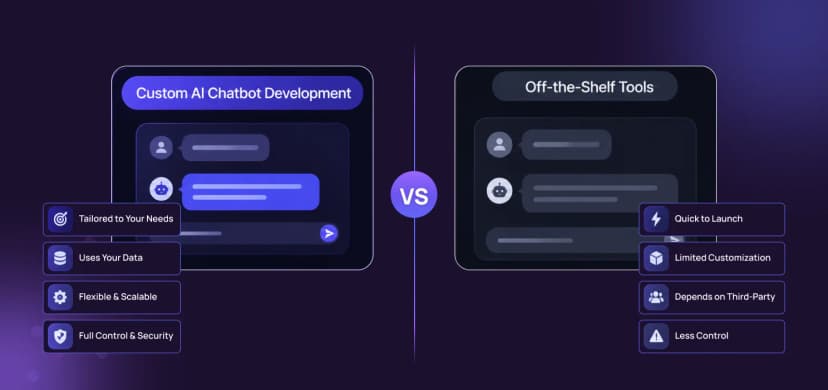
That is the heart of the custom CRM vs Salesforce question. It is not “which is better?” It is “which fits how we actually sell?” Let’s work it out with real numbers.
Salesforce is a ready-made platform. You pay per user, and you configure it to fit your team. It comes with many features, a big partner network, and years of polish.
Custom CRM development means building software around your own sales process. You decide the fields, screens, rules, and reports. You own the code and the data, and you pay for the build and for upkeep.
A third path exists too: keep Salesforce and add custom pieces around it, or use an open-source CRM as a base. We will cover that hybrid route later.
| Factor | Salesforce | Custom CRM |
| Time to start | Days to weeks, plus setup | Weeks to months |
| Cost model | Per user, every month | Build cost plus yearly upkeep |
| Fit to your process | Configure within its limits | Built around your process |
| Integrations | Large marketplace, some extra fees | Any system you use |
| Data and code ownership | Data yours, platform theirs | You own both |
| Upgrades | Handled by Salesforce | Planned by you and your team |
| Scaling cost | Rises with every new user | Mostly flat per added user |
| Best for | Standard sales, fast start | Unique process, large teams |
Salesforce publishes list prices. For Sales Cloud, current guides show five main editions, from $25 per user per month for Starter Suite up to $550 for the top AI tier. Only Starter can be billed monthly. The rest are annual contracts.

Salesforce Sales Cloud list prices, per user per month, billed annually (Starter can be monthly).
Source: SaaS CRM Review (checked July 2026) and Salesforce pricing. Prices and plan names change
According to SaaS CRM Review, most growing teams land on Enterprise at $175 per user per month, because that is where full API access and advanced pipeline tools appear. One more thing: one recent guide reports that Salesforce is restructuring its Sales Cloud plans and names, so check the official pricing page for what applies today.

Costs that often sit on top of a Salesforce list price.
Sources: SpotSaaS and LeadHaste. Your own quote will differ
| Note
None of this makes Salesforce a bad choice. For a standard sales process and a small team, it is often the smartest and fastest option. The question is what it costs you at your size, over several years. |
Custom CRM prices depend on how many features and integrations you need. The GoodFirms 2026 survey of software companies found that medium projects typically cost $30,000 to $100,000 and large projects $100,000 to $200,000. A focused CRM with contacts, a deal pipeline, tasks, reports, and a few integrations often fits in the medium range.
Plan for these extras as well:
Our guide to AWS and cloud infrastructure covers the hosting side.
Here is the key idea. Salesforce costs rise with every person you add. A custom CRM costs roughly the same whether you have 15 users or 50. So at some team size, the lines cross.
Let’s try a simple example. Assume Salesforce Enterprise at $175 per user per month, which is $2,100 per user per year, with no add-ons. Assume a custom CRM that costs $100,000 to build and $15,000 a year to maintain. The break-even point is the build cost divided by the yearly savings.

When does the math flip
The pattern is clear. With 10 users, Salesforce stays cheaper for well over a decade. With 25 users, a custom CRM pays for itself in under three years. With 50 or more, it can pay back in about a year.
| Tip
Run this calculation with your own numbers. Use your real user count, your actual Salesforce quote with add-ons, and an itemized quote for the custom build. Also count your team’s growth over the next three years, not just today. |
Be fair to both sides. This example leaves out Salesforce setup fees and add-ons, which would make Salesforce costlier. It also leaves out hosting and future custom features, which would make a custom CRM costlier. The point is not the exact answer. It is to see how the two cost curves behave.

✔️ Your sales process is fairly standard.
✔️ Your team is small, say under 15 users.
✔️ You need to start in days, not months.
✔️ You want a big ecosystem of ready-made apps and consultants.
✔️ You prefer that the vendor handles upgrades and security.
✔️ You do not have a team to maintain custom software.
✔️ Your process is unique. Special quoting, approvals, or multi-step deals.
✔️ You have many users. Per-seat fees add up fast.
✔️ You need deep integrations. Your own systems, billing, or industry tools.
✔️ You want to own your data and roadmap. No dependence on a vendor’s plans.
✔️ The CRM is part of your product. It is how you serve your customers.
✔️ You are tired of workarounds. Your team fights the tool every day.

Yes. Many companies use a hybrid approach.
Salesforce plus custom pieces. Keep Salesforce for the core CRM, and build custom integrations, portals, or tools around it. This keeps risk low while fixing the biggest gaps.
Open-source base. Start from an open-source CRM and customize it. This can cut build time, but you still need developers to maintain it.
Whichever route you choose, treat the first release as a test. Our post on rapid app prototyping shows how a small first version lowers risk.
If you build, start with the essentials. You can add more later.

Salesforce risks
Costs creep up with add-ons and price rises. Complex setups often need a dedicated admin or partner. And your process can end up shaped by what the tool allows, not by what your business needs.
Custom CRM risks
You are responsible for upkeep, security, and fixes. If your developer leaves and the code is messy, you can get stuck. Reduce this by choosing a team that documents the code, uses standard tools, and offers support. Read why regular QA audits and ongoing maintenance matter for any custom system.

Notice that step one is about your people and process, not technology. A CRM that matches how your team really sells gets used. One that does not gets ignored, however fancy it is.
The right CRM development company should understand sales, not only code. Use this checklist.
| Did you know?
Many CRM projects fail because of low adoption, not bad technology. Involve two or three real sales reps in the design from week one. If they love it, the rest of the team will follow. |
If you decide to leave Salesforce, do it in stages. A sudden switch is the most common way these projects go wrong.
Done well, the move feels boring, and that is exactly what you want from a CRM change.
If the answers show standard needs and a small team, stay with Salesforce. If they show unusual workflows or a fast-growing team, a custom CRM deserves a real quote.
Copying Salesforce feature for feature. A custom CRM should do fewer things, better. Copy your process, not another product.
Skipping the sales team. If reps are not involved, they will not use it.
Underestimating data migration. Messy old data creates messy new data. Clean it before you move it.
Forgetting upkeep. Budget 10% to 20% a year for maintenance, as the GoodFirms survey suggests.
Comparing only price. Compare fit, risk, and total cost over three to five years.
There is no single winner in custom CRM vs Salesforce. Salesforce is faster to start and strong for standard sales. Custom CRM development fits unique processes and growing teams, and it can cost less over time.
Look at your team size, your process, and your three-year plan. If you are unsure, start with a small custom piece or a hybrid, then decide with real results. And whatever you pick, make sure your team will actually use it.

Published Sales Cloud list prices in 2026 range from $25 per user per month for Starter Suite to $550 for the top tier, with Pro Suite at $100, Enterprise at $175 and Unlimited at $350. Prices and plan names change, so check Salesforce for current rates.
In the GoodFirms 2026 survey, medium software projects typically cost $30,000 to $100,000 and large ones $100,000 to $200,000. Plan for 10% to 20% a year for maintenance.
Choose custom when your sales process is unique, you need deep integrations, you have many users, or you want full control of your data and roadmap.
Yes. Many companies keep Salesforce as the core CRM and build custom integrations or tools around it. This hybrid approach lowers risk.
Catch wind of the latest technologies, strategies, and information that are set to boost your business operation. We update frequently!