Technologies 05.11.2026
 SpeedyGo: One plugin to make your WordPress website faster
 Corvexa: AI that turn more website visitors into qualified leads.


 Energy
 Oil and gas
 Transportation
 E-commerce
 Healthcare
 Real Estate
 Fintech
 Manufacturing
 Education
 Agriculture
 Travel
 Cyber Security
 Crypto
 Law and Order
 Entertainment
 Hospitality
 Logistics
 Non-profit
 Digital Industry
 Venture Capital

A Quick Guide on the Right Software Development Approach for Enterprises in 2023


 05/11/2026


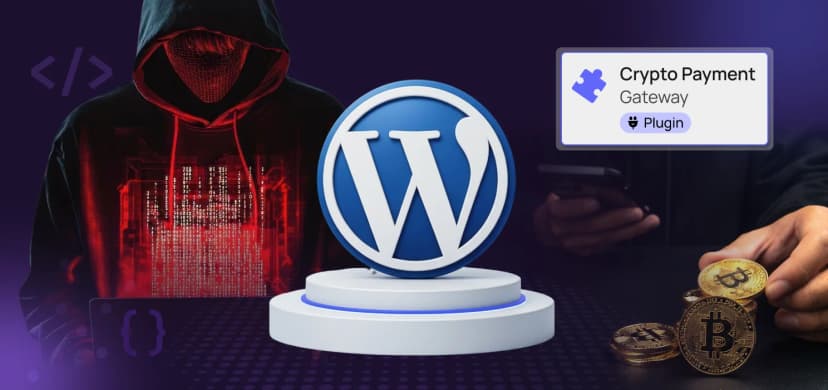
A plugin that helps websites accept crypto has a serious security hole. Attackers are already trying to use it. Here is the story, plus the exact steps to protect your site
| Short version
If your WordPress site uses the CryptoPayment Gateway plugin (versions 1.2.1 or 1.2.2), remove it today and replace your wallet keys. |
Security researchers at a company called Defused Cyber noticed something worrying. Hackers are trying to break into websites that use a WordPress plugin named CryptoPayment Gateway. This plugin lets online shops accept payments in cryptocurrency.

The security hole is officially named CVE-2026-81648. A CVE is just a public ID number for a known security problem, so everyone can talk about the same bug.

Think of a shop with a back office. Only the owner should be allowed in. In this plugin, one door to that back office has no lock and no guard. Anyone on the internet can walk in and press the owner’s buttons.
In technical terms, one of the plugin’s AJAX endpoints (a small background web address the plugin uses to do tasks) does not check whether the visitor is allowed to use it. This is called a missing authorization check. According to the public record on the US National Vulnerability Database, a stranger could use this to:
| What the attacker can do | Why it hurts |
| Delete any file on your server | Your site can break, or important security files can be wiped. |
| Change your payment settings | Customer payments could be sent to the attacker’s wallet instead of yours. |
| Read your saved wallet credentials | They are stored as plain readable text (“cleartext”), so anyone who grabs them can try to take your money. |

Versions 1.2.1 to 1.2.2 have the bug. Version 1.2.2 is the newest one, so you cannot simply “update to the latest version” to be safe. The vulnerability tracker WP Scan lists no known fix.
There is another warning sign. On August 28, 2026, the plugin was closed on the official WordPress Plugin Directory. It can no longer be downloaded there. The listed reason was only a general “security issue”.


Probably not many. The plugin has been downloaded 1,845 times in total, and about 20 times in the last seven days. Nobody knows how many of those copies are still running on live websites.
But do not relax just because the number is small. Shops that use crypto plugins often hold real money, and that makes them a good target. Defused Cyber also said the attacks came from servers sold as “anonymous” hosting with no identity checks, which suggests the attackers want to hide who they are.
| The safe plan
Because there is no patch, the only real protection is to remove the plugin, change your keys, and check your site for damage. |
If you can use the command line with WP-CLI (a free tool for managing WordPress), run:
wp plugin list | grep -i crypto
No command line? Open your WordPress dashboard and go to Plugins → Installed Plugins, then look for “CryptoPayment Gateway”.
Turning a plugin off is not enough. Delete it. Replace plugin-folder-name with the real folder name shown in the list above (check it first, since it may differ).
wp plugin deactivate plugin-folder-name
wp plugin delete plugin-folder-name
Assume the keys the plugin saved are already stolen. Create a new wallet or new API keys with your wallet provider, move your funds to the safe place, and update your shop to use the new details. Do this on a clean device if you can.
See which files changed in the last 30 days:
find wp-content -type f -mtime -30 -ls
Check that no strange admin users were added:
wp user list –role=administrator
Compare WordPress core and your other plugins with the official originals. Any “FAILED” line means a file was changed:
wp core verify-checksums
wp plugin verify-checksums –all
Search your web server log for suspicious POST requests to the AJAX address (the log path is different on every host, so adjust it):
grep “admin-ajax.php” /var/log/nginx/access.log | grep POST | tail -n 100
Many requests from one unknown address, especially around the date the attacks started, deserve a closer look.
Choose a payment plugin that is still updated, has many active installs, and is listed on the official WordPress directory. Better still, use a hosted payment service, so wallet secrets never sit on your own server.
These lines in wp-config.php stop people from editing plugin files inside the dashboard and turn on automatic security updates for WordPress core:
define( ‘DISALLOW_FILE_EDIT’, true );
define( ‘WP_AUTO_UPDATE_CORE’, true );
Also keep regular backups stored away from your server, so you can recover if files are deleted.
Two simple habits would have reduced the risk here:


CryptoPayment Gateway versions 1.2.1 and 1.2.2 are affected. According to the vulnerability information described in this article, no patched version is currently available.
Security researchers at Defused Cyber have reported attempts to exploit the vulnerability. Websites using affected versions should treat the issue as a serious security risk and investigate possible unauthorized activity.
Check whether CryptoPayment Gateway is installed, remove the vulnerable plugin, rotate any exposed wallet credentials, review administrator accounts, inspect website files, and monitor server logs for suspicious activity.
The vulnerability may expose wallet credentials or allow attackers to modify payment settings. Depending on the credentials involved, attackers could potentially redirect customer payments or access cryptocurrency funds.
No. If version 1.2.2 remains the latest release and no security patch is available, updating alone will not resolve the vulnerability. Removing the affected plugin and securing exposed credentials is the safer approach.
Review recent file modifications, check for unknown administrator accounts, verify WordPress core and plugin checksums, inspect payment configurations, and examine server logs for suspicious requests.
Consider a regularly maintained cryptocurrency payment solution with a strong security history. A hosted payment gateway that keeps sensitive wallet credentials outside your WordPress server can reduce exposure.
Catch wind of the latest technologies, strategies, and information that are set to boost your business operation. We update frequently!