Technologies 30.10.2026
30.10.2026 SpeedyGo: One plugin to make your WordPress website faster
 Corvexa: AI that turn more website visitors into qualified leads.

 Energy
 Oil and gas
 Transportation
 E-commerce
 Healthcare
 Real Estate
 Fintech
 Manufacturing
 Education
 Agriculture
 Travel
 Cyber Security
 Crypto
 Law and Order
 Entertainment
 Hospitality
 Logistics
 Non-profit
 Digital Industry
 Venture Capital
A Quick Guide on the Right Software Development Approach for Enterprises in 2023


 25/08/2026


In this guide, we will look at the key features a successful corporate website needs, from UX and navigation to performance, security, SEO, content, integrations, and lead generation. You will also learn which features are essential, which are optional, and how to avoid building a corporate website that looks professional but does not actually help the business.

Corporate website development is the process of designing and building a website for an established company, organisation, or B2B business. Unlike a simple brochure website, a corporate website often needs to support several audiences at once.
For example:
Each visitor may arrive with a different goal. A potential client may want to understand your services. A job applicant may want to explore your culture. A partner may be looking for company information. An investor may want to understand your business and leadership. This means the website needs a clear structure that helps different users find what matters to them.

A corporate website can influence how people perceive your company before they ever speak with your team.
Think about your own behaviour. If you are considering a company, you probably look at its website.
You may check:
What does the company do?
Who do they work with?
What services do they provide?
Do they seem credible?
Do they understand businesses like mine?
How can I contact them?
Your website needs to answer these questions without making visitors work too hard. And there is a bigger reason to take this seriously.
Research from Stanford’s Web Credibility Research suggests that website design can significantly influence how users perceive a company’s credibility. So the website is not simply a digital business card. It is part of your company’s reputation.

A successful corporate website usually brings together several elements: Clear messaging + strong UX + credible content + responsive design + performance + SEO + security + conversion paths
You do not need hundreds of features. You need the right features working together. Let’s look at the most important ones.

A visitor should understand what your company does quickly. Do not make someone scroll through three sections to figure out what you actually offer. Your hero section should answer:
What do you do?
Who do you help?
Why should someone care?
For example, instead of saying: “We deliver innovative digital transformation solutions.”
you could say something more specific: “We build custom web and SaaS solutions for businesses ready to scale.”
The second statement gives visitors a clearer idea of what the company actually does.

A beautiful website becomes frustrating when visitors cannot find anything. Corporate websites can become especially complicated because companies often have many services, industries, locations, resources and departments. That is why navigation needs to be planned carefully.
A typical corporate navigation might include:
You do not necessarily need all of these. The structure should reflect what your audience actually needs.

Your corporate website needs to work across:
Responsive design should not mean simply shrinking the desktop version. The experience needs to be considered for smaller screens.
That includes:
Google also uses mobile-first indexing, meaning the mobile version of a website is primarily used for indexing and ranking. So mobile experience is no longer optional.

Your corporate website should feel like your company. That means consistently using:
But good branding does not mean adding your logo everywhere. It means creating a consistent experience. When someone moves from your website to your LinkedIn page, presentation, sales deck, or email, the brand should feel connected.

A corporate website should clearly explain what the company offers. Avoid creating one huge page containing every service. Instead, create focused pages where appropriate.
A strong service page can explain:
This also creates more opportunities to target specific search queries.

If your company works across multiple industries, industry pages can be extremely useful. For example:
A visitor should be able to quickly understand: “Do they understand businesses like mine?”
Instead of simply saying that you work with many industries, show how your solutions apply to each one.

One of the biggest weaknesses of corporate websites is talking too much about the company and not enough about results.
Instead of only saying: “We provide high-quality development services.” show what you have actually done.

If your company has worked with recognised organisations, displaying relevant client logos can provide useful social proof.
Other trust signals can include:
The important thing is authenticity. Do not fill a page with logos without explaining why they matter.

The About page is often treated like an afterthought. It should not be.
Potential customers want to understand:
Who are we working with?
What does this company believe?
How experienced are they?
Who will be responsible for our project?
A good About page can include:
But keep the focus on what builds trust.

Your corporate website should make it easy for interested visitors to take the next step. That could be:
Do not assume visitors will find your contact page themselves. Create natural conversion opportunities throughout the website.
Good CTA examples include:
Talk to our team
Request a consultation
Get a project estimate
Discuss your requirements
Start a conversation
The CTA should match the visitor’s intent.

One common mistake is asking for too much information. A form asking for:
may look useful internally. But every additional field can create more friction. Ask for what you actually need at that stage. You can collect more information during the sales conversation.

Large corporate websites can contain hundreds or thousands of pages. At that point, search becomes valuable.
A useful site search can help visitors find:
Search should return useful and relevant results rather than simply matching random words.

A blog is not only for publishing company announcements. It can become an important part of your organic search and content strategy.
You can create content around:
For example, someone searching for a problem your service solves may discover your article before they ever know your company. That creates an opportunity to build trust before the sales conversation.

Corporate website development should consider SEO from the beginning. Important elements include:
SEO should not be treated as something you sprinkle onto the website after development. The architecture itself should support discoverability.

Imagine finding the exact service you need. You click the page. Then you wait. And wait. You probably leave. Performance affects both user experience and business outcomes.
Common performance considerations include:
Google’s Core Web Vitals provide metrics for loading performance, responsiveness and visual stability. The important point is simple:
A corporate website should feel fast, not simply look fast.

A successful corporate website should be usable by as many people as possible. Accessibility considerations can include:
Accessibility is not just a technical checkbox. It is part of creating a better experience for your audience.

Corporate websites can become targets because they often contain valuable business information and connect to other systems. Security considerations can include:
If your website has customer accounts or sensitive information, security becomes even more important.

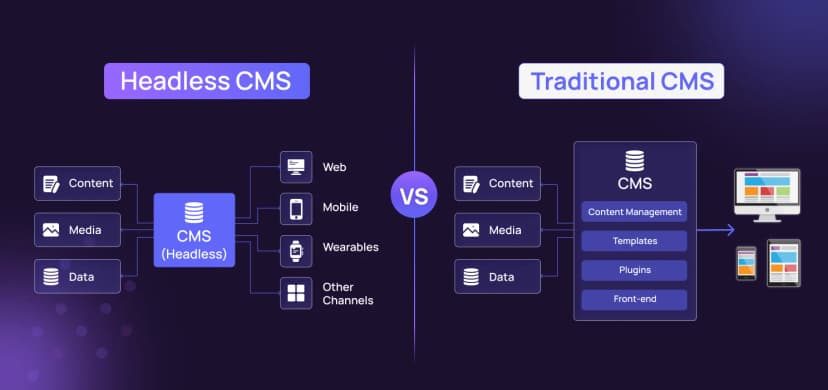
Your marketing team should not need a developer every time they want to update a headline. A suitable CMS can allow authorised users to manage:
The CMS should be easy enough for the team to use while providing appropriate control.

Corporate websites often need to connect with the rest of the organisation. For example:
Website → CRM
New leads automatically enter the sales pipeline.
Website → Marketing automation
Visitors can receive relevant follow-up communications.
Website → ERP
Product or operational information can be synchronised.
Website → Recruitment system
Job openings can be displayed automatically.
These integrations reduce manual work and create a more connected digital ecosystem.

You cannot improve what you cannot measure. A corporate website should track meaningful behaviour such as:
The goal is not to collect every possible metric. It is to understand: What are visitors doing, and where are they getting stuck?

Personalisation can make corporate websites more relevant. For example, content can potentially be adapted based on:
But personalisation should be used carefully. The experience should feel helpful, not intrusive.

Global businesses may need websites in multiple languages. This introduces additional requirements around:
International websites should be planned for these requirements from the architecture stage rather than simply translating pages at the end.

For many corporate companies, the website is also a recruitment tool. A strong careers section can showcase:
Candidates are evaluating you just as much as customers are.

FAQ sections can reduce friction by answering common questions before visitors contact sales. They can cover:
FAQs can also help search engines understand the topics your website covers when implemented appropriately.

How Code and Core approaches corporate website development
At Code and Core, corporate website development can combine strategy, UX/UI design, branding, development, performance, integrations and ongoing support.
The goal is not simply to create a polished corporate website.
It is to create a digital experience that supports the company’s larger objectives.
Depending on the project, development can involve technologies such as React, Next.js, PHP, Laravel, Node.js, Python, MySQL, MongoDB and AWS.
The right technology depends on what the website needs to accomplish.
A corporate website for a global enterprise may require a very different approach from a growing B2B company.
That is why the starting point should always be the business problem, audience and goals.
A successful corporate website is more than a collection of pages. It should communicate clearly, build trust, help users find answers, generate opportunities, and perform securely. The right features are not always the flashiest. Clear navigation, strong case studies, fast pages, and effective CTAs often matter more than complex animations.
So, instead of asking, “What features should we add?” ask, “What should this website help our users and business achieve?” Code and Core can help you plan, design, and develop a corporate website built around your goals, users, and long-term growth.
Catch wind of the latest technologies, strategies, and information that are set to boost your business operation. We update frequently!