Development, Technologies 01.10.2026
01.10.2026 SpeedyGo: One plugin to make your WordPress website faster
 Corvexa: AI that turn more website visitors into qualified leads.

 Energy
 Oil and gas
 Transportation
 E-commerce
 Healthcare
 Real Estate
 Fintech
 Manufacturing
 Education
 Agriculture
 Travel
 Cyber Security
 Crypto
 Law and Order
 Entertainment
 Hospitality
 Logistics
 Non-profit
 Digital Industry
 Venture Capital
A Quick Guide on the Right Software Development Approach for Enterprises in 2023


 01/10/2026


| Quick summary
This guide explains headless cms vs. traditional cms in plain English. You will learn how each one works, when to use headless CMS, when a normal CMS is the smarter buy, and what to ask before you hire anyone.
|
Here is a mistake we see all the time. A business owner hears that “headless” is the future. They tell their developer to build a headless site. Six months and a large bill later, they have a fast website that their marketing team cannot edit without calling a developer.
The opposite happens too. A fast-growing brand stays on a traditional setup for too long. Pages slow down. Every new app or channel needs a painful workaround.
Neither owner made a bad choice because they were careless. They made it because nobody explained the trade-off in simple words. So let’s do that now.
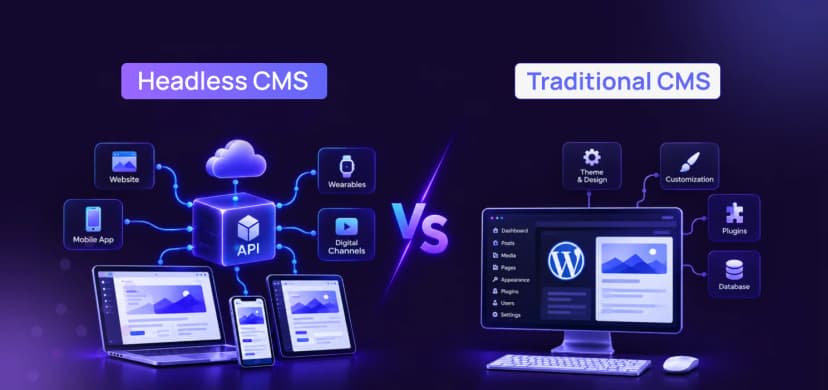
A CMS, or content management system, is the tool you use to add and edit pages without writing code. A traditional CMS does two jobs in one box. It stores your content, and it also builds the pages people see.
Think of a restaurant where the same person cooks and serves. It is simple. One team, one kitchen, one menu.
WordPress, Drupal, Joomla, and Shopify all work this way by default. WordPress is by far the biggest. According to W3Techs, 41.5% of all websites ran on it in July 2026.

Traditional CMS
Why people love it: it is quick to launch, easy to edit, and has thousands of ready-made plugins. For most small business sites, that is exactly what you need.
A headless CMS only does the first job. It stores and manages your content. It does not build the pages. The “head” (the part people see) is removed.
Instead, the CMS sends your content through an API. Think of an API as a waiter who carries information from the kitchen to any table you like. That table can be a website, a mobile app, a smart TV, or even a store screen.
Your developers then build the front end separately, often with tools like React or Next.js. The content team still logs into a simple dashboard to write and update things.

Headless CMS
| Did you know?
WordPress can be headless too. It has a built-in REST API, so it can be the content backend while a modern framework builds the front end. Code and Core used this idea on the Agora website, a headless WordPress build that runs as a fast one-page application. |
Here is the honest comparison, without the sales talk.
| Question | Traditional CMS | Headless CMS |
| Setup speed | Fast. Often weeks. | Slower. Front end must be built. |
| Starting cost | Lower | Higher |
| Page speed | Good if well optimized | Excellent when built well |
| Editing for non-tech teams | Very easy, with live preview | Easy, but preview needs extra setup |
| Multiple channels (web, app, kiosk) | Hard | Built for it |
| Design freedom | Limited by themes | Almost unlimited |
| Scaling with heavy traffic | Needs careful tuning | Easier to scale each part |
| Ongoing developer need | Low to medium | Medium to high |
Notice something? Neither column wins every row. That is the whole point. It is not “old vs new”. It is “which fits your goals”.
This is the question that matters most. Here are the situations where headless usually pays off.
✔ You publish to more than one place. A website, an app, and maybe in-store screens, all from one content source.
✔ Speed is tied to revenue. Online stores and lead-generation sites lose money for every extra second.
✔ You need a custom experience. Complex animations, unusual layouts, or interactive tools that themes cannot handle.
✔ Your traffic will grow fast. You want to scale the front end without touching the content system.
✔ You have a developer team (or a partner) ready. Headless needs ongoing technical care.
Do not skip this part. A traditional setup is often the better buy, and a trustworthy agency will tell you so.
Pick a traditional CMS if you run a blog, a brochure site, a local business site, or a small store. If your marketing team edits pages daily and wants to see changes live, a traditional CMS keeps life simple.
It also makes sense if your budget is tight or you need to launch in a few weeks. You can always move to headless later, once the business has outgrown the first setup.
| Note
Headless does not fix a slow, messy website by itself. A badly built headless site can be slower than a well-tuned WordPress site. The quality of the build matters more than the label. |
It can. And speed is not a vanity number. Google’s research found that as page load time goes from 1 second to 3 seconds, the chance a visitor leaves grows by 32%. At 5 seconds it grows by 90%.

Page load time, compared with a 1 second load
Money follows the same pattern. A Deloitte and Google study found that making mobile sites just 0.1 seconds faster lifted retail conversions by 8.4%. Tiny gains, real revenue.
Headless sites are quick because the front end can be pre-built and served from a content delivery network (CDN) close to each visitor. There is no heavy database work on every page view.
| Tip
Before choosing anything, test your current site on Google PageSpeed Insights. If your score is already strong, your problem may not be the CMS at all. |

Code and Core
There is no single winner, because “scale” means different things. Ask yourself which kind you need.
Scaling traffic
Can the site handle a big spike, like a sale or a viral post? Headless usually wins here because the front end can be spread across a CDN and cloud servers. A traditional CMS can also cope with the right hosting and caching, but it needs more tuning. If cloud hosting is on your mind, our guide to AWS and cloud infrastructure for scaling your web app is a good next read.
Scaling channels
Will your content live on a site, an app, and more? Headless wins clearly. You write once and publish everywhere.
Scaling your team
Can many editors and developers work at once without breaking things? Headless splits content and code, so both teams move independently. On the flip side, a traditional CMS is easier to hand over to a non-technical team.
So the best CMS for scalability is the one that scales the thing you actually care about. A busy store may want headless. A growing blog may just need better hosting.
Use this before you talk to any developer. It takes about an hour and can save months.
| Did you know?
You do not have to rebuild everything. Some teams go “hybrid”: they keep WordPress for editing and add a headless front end only on the pages that matter most, like landing pages. |
This is where the title question gets a direct answer. Hire for the outcome, not the buzzword.
If you need a clean site with easy editing, hire a team to build a well-optimized traditional CMS. Our post on custom WordPress development for performance shows how far a tuned setup can go.
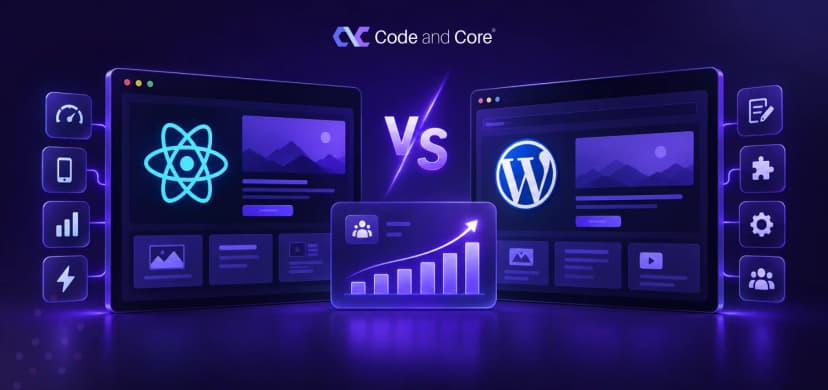
If you need speed, custom design, and many channels, hire for a headless build with a modern front end. Our comparison of React vs WordPress and conversions explains that side in more depth.
If you already have a big WordPress site, ask about a gradual move. Read migrating to enterprise WordPress to see what a safe migration looks like.
A headless CMS development company should be more than good coders. They should understand your business, explain trade-offs, and stay around after launch. Here is a short checklist.
✔ They ask about your goals before they suggest any technology.
✔ They can show finished headless projects, with live links you can test.
✔ They are honest about when you do not need headless.
✔ They cover SEO basics, like clean URLs, metadata, and fast rendering.
✔ They offer support and maintenance after launch.
✔ They sign an NDA and explain who owns the code.
✔ They match your working hours and communicate clearly.
Also think about how you will hire. A dedicated team works well for long projects, while fixed price suits a clear scope. We compare these options in dedicated development teams vs project-based hiring.
| Note
Ask who will handle content preview. Editors love seeing their changes before publishing, and headless setups need this built on purpose. |
Going headless for the trend. If you have one website and a small team, the extra cost may not return value.
Ignoring SEO. Search engines need to read your pages easily. Server-side rendering or static generation solves this, but it must be planned from day one.
Forgetting the editors. The best build fails if your content team hates using it. Involve them early.
Skipping maintenance. More moving parts means more updates. Plan monthly care from the start.

Code and Core
The real answer to headless cms vs. traditional cms is simple. Neither is better in every case. Traditional is quicker and cheaper to start. Headless is more flexible and easier to grow across channels.
Choose based on your goals, your team, and your budget. Then hire people who will tell you the truth. If you want a second opinion on your project, we are happy to help
Sources
W3Techs, “Usage statistics of WordPress” (July 2026): w3techs.com/technologies/details/cm-wordpress
Think with Google, “Find Out How You Stack Up to New Industry Benchmarks for Mobile Page Speed”: thinkwithgoogle.com
Deloitte and Google, “Milliseconds Make Millions”: deloitte.com
WordPress Developer Resources, “REST API Handbook”: developer.wordpress.org/rest-api
Google, “PageSpeed Insights”: pagespeed.web.dev

Code and Core

Use it when your content must appear on several channels, when you need very fast pages, or when your traffic and features will grow quickly. If you only run one simple website, a traditional CMS is often enough.
It can be, because it allows faster pages and cleaner code. But SEO still depends on how well the front end is built, so the result is not automatic.
The first build usually costs more because you need a separate front end. Over time it can save money for large or multi-channel projects, since one content source feeds everything.
Yes. WordPress has a built-in REST API, so it can act as the content backend while a framework such as React or Next.js builds the front end.
Catch wind of the latest technologies, strategies, and information that are set to boost your business operation. We update frequently!