Development, Technologies 02.10.2026
02.10.2026 SpeedyGo: One plugin to make your WordPress website faster
 Corvexa: AI that turn more website visitors into qualified leads.

 Energy
 Oil and gas
 Transportation
 E-commerce
 Healthcare
 Real Estate
 Fintech
 Manufacturing
 Education
 Agriculture
 Travel
 Cyber Security
 Crypto
 Law and Order
 Entertainment
 Hospitality
 Logistics
 Non-profit
 Digital Industry
 Venture Capital
A Quick Guide on the Right Software Development Approach for Enterprises in 2023


 20/08/2026


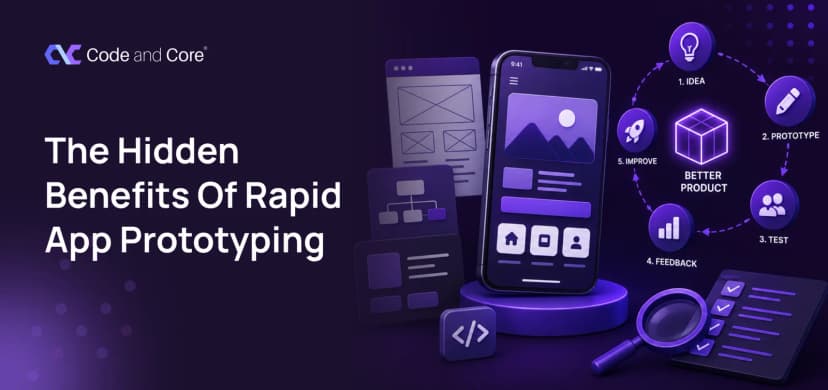
In this guide, we’ll look at what rapid prototyping actually means, how it fits into product design, where it saves development costs, what a good prototype should contain, common mistakes teams make, and how to use prototypes to make better product decisions before committing serious development time.
You have an idea for a digital product. The screens are clear in your head, the features sound promising, and everyone on the team is excited to start building.
So why not just start development?
Because building the wrong thing quickly is still expensive.
A developer can spend days or weeks turning an idea into a working feature, only for the team to discover later that users do not understand it, the workflow is too complicated, or an important requirement was misunderstood.
Rapid prototyping helps catch those problems earlier.

Rapid prototyping is the process of creating a simplified, testable version of a digital product or feature before fully developing it.
It could be:
The prototype does not need to be perfect.
In fact, it is often better when it isn’t. The purpose is to answer questions such as:
Does this idea make sense?
Can users understand the flow?
Are we solving the right problem?
Does the feature actually need to work this way?
Is anything missing?
Can this realistically be built?
These questions are much cheaper to answer before development.

Imagine a company wants to build a new customer dashboard. The team discusses the requirements, everyone agrees, and development begins. After three weeks, the first version is ready.
Then someone says: “Wait. Customers need to see this information first.”
Another person says: “I thought this button opened the reports.”
And the customer team says: “Our users won’t understand this.”
Now the team has a problem.
The developers have already built the feature.
Changing it may require:
The original mistake happened before development started. But the cost appeared during development. That is one of the biggest reasons prototyping matters.
There is a simple principle behind this: The later you discover a problem, the more expensive it usually becomes to fix.
Changing a wireframe can take minutes.
Changing a prototype can take hours.
Changing a developed feature can take days.
Changing a feature after launch can involve development, QA, deployment, customer communication and potentially lost revenue.
You can think about it like this:
| When you discover the problem | Typical impact |
| During brainstorming | Very low |
| During wireframing | Low |
| During prototyping | Low to moderate |
| During development | Moderate to high |
| During QA | High |
| After launch | Potentially very high |

This is perhaps the most important way to think about prototypes.
Teams often say: “We need to build this feature.”
But what they actually have is an assumption: “We believe users need this feature and will use it in this way.”
A prototype gives you a way to test that assumption.

Much more than people expect.
Can users find what they need?
Home
↓
Products
↓
Category
↓
Product
↓
Checkout
If users get lost here, development should not start yet.
Can someone complete the intended task? Maybe you discover that asking users to create a profile before showing the product creates unnecessary friction. Better to find that out in a prototype.
What information needs to appear first? A prototype can help answer whether users notice:
This is where product design and content strategy start working together.
What happens when someone:
A static screen cannot always answer these questions. An interactive prototype can.

One common mistake is assuming every prototype needs to look like the finished product. It doesn’t.
There are different levels.
Simple boxes, text and basic flows.
Best for: Structure + ideas
More realistic layouts and interactions.
Best for: User flows + usability
Detailed visual design, interactions and realistic content.
Best for: Stakeholder approval + usability testing + developer handoff
The trick is knowing how much detail you actually need.
If you are still deciding whether the workflow makes sense, spending hours perfecting shadows and gradients is not useful.
Product design is much broader than visual design. It connects: Business goals + User needs + Technology + Experience
A product designer may ask:
Rapid prototyping gives designers a practical way to explore these questions. Instead of debating endlessly in meetings, the team can put an idea in front of someone and observe what happens.

Product development usually involves multiple people.
You may have: Founder → Product Manager → Designer → Developer → QA → Marketing → Customer Support
Everyone can interpret a written requirement differently.
For example: “Users should be able to quickly create a project.”
What does “quickly” mean?
One person might imagine three steps.
Another might imagine six.
A developer may interpret the requirement differently again.
A prototype gives everyone something concrete to discuss.
This happens often. You start designing a simple feature and suddenly realise:
“What happens if the user doesn’t have permission?”
Or: “What if the payment fails?”
Or: “What happens when there are no results?”
Or: “What if the user wants to undo the action?”
These situations are easy to overlook when discussing features abstractly.
They become obvious when you try to simulate the experience.
A request may sound harmless: “Can we just move this button?” Sometimes the answer is yes.
Sometimes that tiny visual change affects:
This is why design decisions should be explored before implementation wherever possible. A prototype helps the team understand the interaction before engineering commits to it.
One of the biggest benefits is deciding what not to build. When teams are excited about a new product, the feature list can grow quickly.
You start with: MVP
Then someone adds:
Suddenly the “minimum viable product” is no longer minimal. Prototyping forces the team to ask: “Does this feature actually need to exist in version one?” If a feature does not contribute meaningfully to the core user journey, it may be possible to postpone it. That saves development time.
There is no universal percentage that applies to every project. Be careful with claims such as: “Prototyping always saves 50% of development costs.” Real projects are not that predictable.
The savings depend on:
The better way to measure the value of prototyping is: How many expensive assumptions did we resolve before development? That is a much more meaningful metric.
Prototyping becomes even more useful when a project has a high level of uncertainty.
For example:
Nobody knows exactly how users will respond.
Multiple steps and roles create more opportunities for confusion.
Dashboards, permissions and onboarding can become complicated quickly.
Small UX problems can affect the path to purchase.
Users need clarity and confidence around important actions.
Workflows can involve multiple users and sensitive processes.
Different teams may have completely different requirements.
Not every change requires a huge UX exercise. If you are:
you probably do not need a full prototype.
The goal is not: Prototype everything.
The goal is: Prototype uncertainty.

Don’t begin with: “Let’s prototype the product.”
Begin with: “What are we trying to learn?”
For example: Can users complete checkout without assistance?
Choose the smallest flow needed to answer the question.
Don’t overdesign it. Build only what you need to test the assumption.
Ask realistic users to perform realistic tasks.
Pay attention to:
Change the flow based on what you learned.
Step 7: Test again
The first prototype does not have to be correct. Its job is to help you get closer to the right solution.
Once the important assumptions have been validated, development can begin with much greater confidence.

These two are often confused.
Used primarily to learn and validate. It may not be production-ready.
A real product with enough functionality to deliver value to actual users. It can be launched and used. Think of the relationship like this:
Idea
↓
Prototype
↓
Validation
↓
MVP
↓
Real users
↓
Iteration
A prototype helps you decide what the MVP should actually contain.
Before spending significant development time on a feature, ask: “What do we still not know?” If the answer is: “We don’t know whether users understand it.”
Prototype it. If the answer is: “We don’t know whether the workflow is practical.”
Prototype it. If the answer is: “We don’t know whether this technical approach is possible.”
Build a technical proof of concept. If the answer is: “We know exactly what needs to be built and why.” Then development may be the right next step.
How Code and Core approaches product design
At Code and Core, product design is treated as more than creating attractive interfaces. The process focuses on understanding the problem, defining the user experience, creating usable interfaces and working toward a solution that can actually be developed. That connection between design and development matters. A prototype should not live in isolation from engineering.
The team needs to think about: User needs + Business goals + Design + Technology
When those four areas are considered together, product decisions become much stronger. Code and Core works across UX/UI design, web development, custom software and mobile development, allowing product ideas to move from early concepts toward real digital products. The company’s UX/UI design services include research, wireframing, prototyping, UI design and testing, with the process adapted according to project requirements and complexity. If you are working on a new product or trying to improve an existing one, this approach can help you answer the important questions before development resources are heavily committed.

Rapid prototyping isn’t extra work. It helps prevent expensive mistakes later. A prototype gives your team a chance to ask:
Does this make sense?
Will users understand it?
Is there a simpler solution?
Are we missing anything?
It’s easier to change an idea before the code is written. So before spending weeks developing a feature: Sketch it. Prototype it. Test it. Learn from it. Then build it.
Because the biggest development cost isn’t building something, it’s building the wrong thing. It is the cost of building something nobody needed, understood or wanted to use.
Ready to turn your product idea into something real? If you have a product concept, feature idea or existing digital product that needs a better experience, Code and Core can help you move from concept → prototype → product. Start the conversation and explore what your product could become.
Catch wind of the latest technologies, strategies, and information that are set to boost your business operation. We update frequently!